Verify PDF Digital Signatures.
Entirely Client-Side.
A JavaScript and TypeScript SDK for verifying digitally signed PDFs — powered by Rust/WASM in the browser, native on Node.js. The document never leaves the device. Zero runtime dependencies. PAdES conformance detection built in.
Quick Start
import { VerifyKitProvider, Viewer, WelcomeScreen,
  useVerification, defaultLayoutPlugin } from '@trexolab/verifykit-react'
import '@trexolab/verifykit-react/styles.css'

function App() {
  return (
    <VerifyKitProvider config={{ theme: { mode: 'system' } }}>
      <PdfViewer />
    </VerifyKitProvider>
  )
}

function PdfViewer() {
  const verification = useVerification()
  const [layout] = useState(() => defaultLayoutPlugin())

  if (!verification.fileBuffer) {
    return <WelcomeScreen onOpenFile={(f) => verification.load(f)} />
  }

  return (
    <Viewer
      fileBuffer={verification.fileBuffer}
      fileName={verification.fileName}
      plugins={[layout.plugin]}
      onOpenFile={(f) => verification.load(f)}
      initialState={{
        signatures: verification.signatures,
        verificationStatus: verification.status ?? undefined,
      }}
    />
  )
}
Verification Pipeline
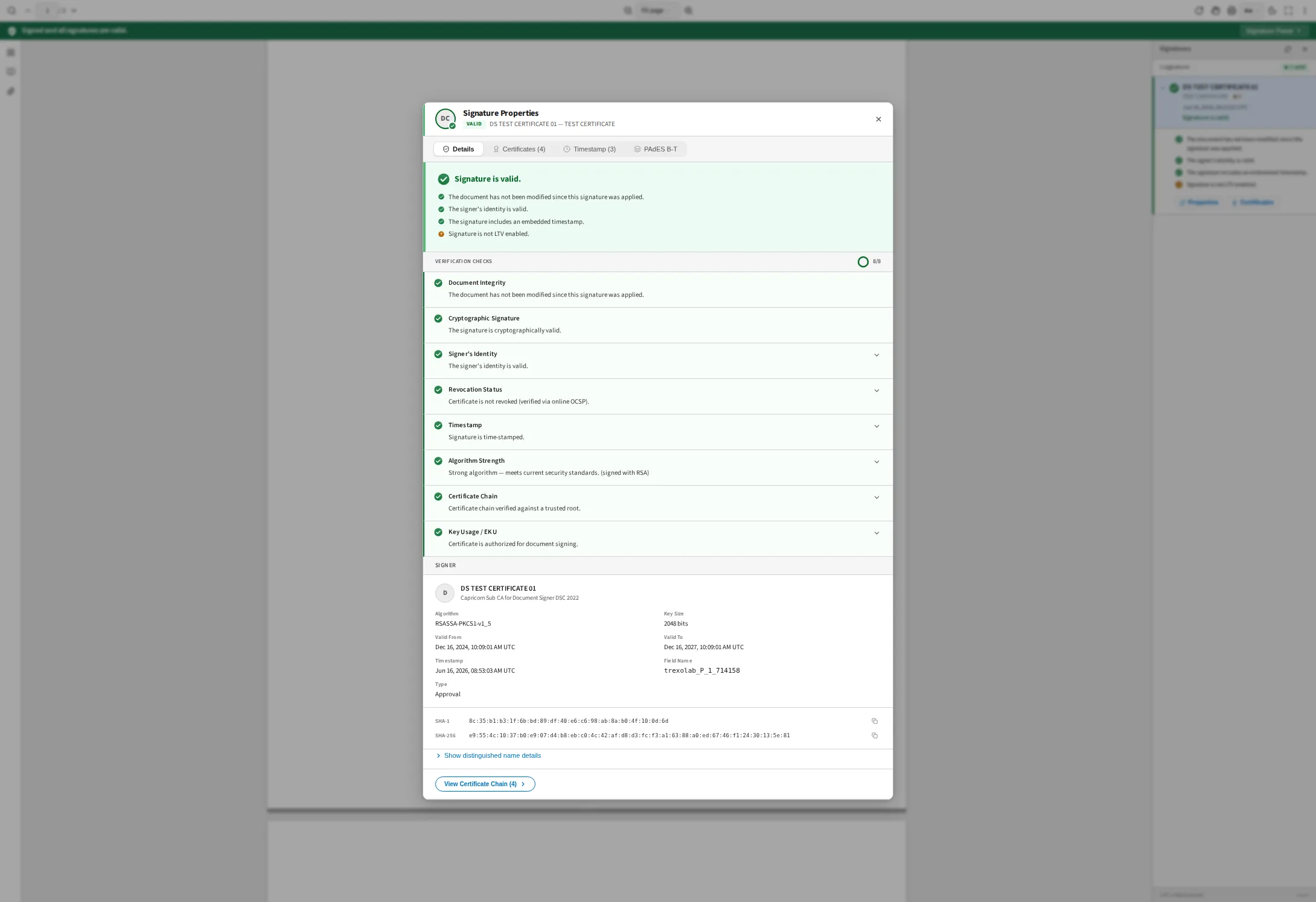
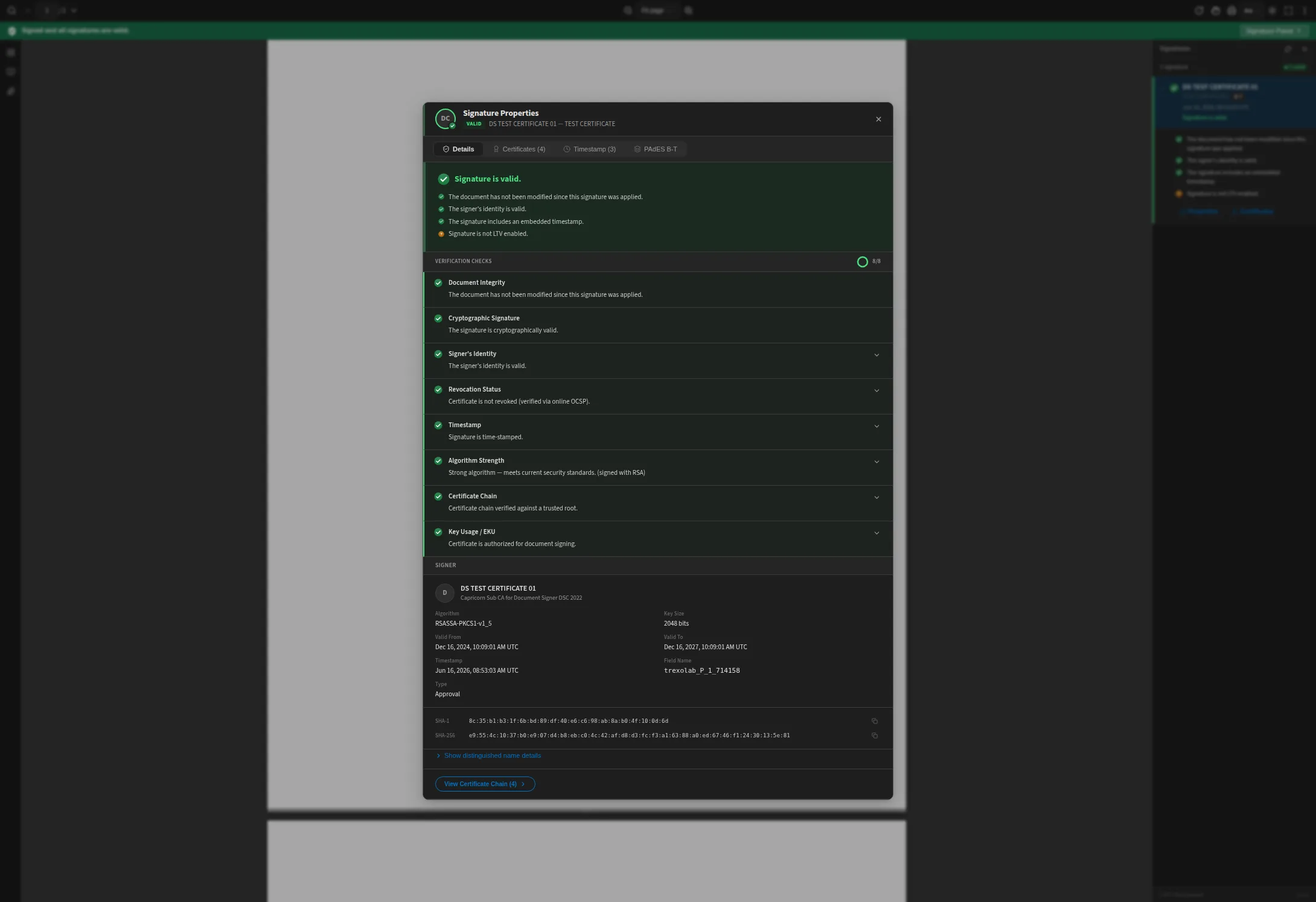
Every signature is checked eight ways. Each check reports its own status and its own reason, and together they produce the verdict — which is why a document can come back valid, altered, or untrusted rather than just failing.
Document Integrity
Re-hashes the byte ranges the signature covers and compares them against the hash sealed inside it. This is the check that catches edits made after signing.
Cryptographic Signature
Confirms the signature is mathematically valid against the signer's public key.
Signer's Identity
One verdict on the signer, combining the certificate's validity period, its revocation state and its chain to a trusted root.
Revocation Status
Checks the signing certificate against OCSP and CRL endpoints to confirm it has not been revoked.
Timestamp
Validates the RFC 3161 timestamp token is present and cryptographically sound.
Algorithm Strength
Enforces minimum cryptographic strength — RSA keys of 2048 bits or more, and SHA-1 scored the way Adobe scores it.
Certificate Chain
Verifies the certificate chains to a trusted root CA from the built-in AATL store.
Key Usage / EKU
Confirms the Key Usage and Extended Key Usage extensions permit document signing.
Features
Zero Server Dependency
All crypto runs client-side in WASM — no backend of your own to build or scale, and your PDF is never uploaded. Only certificate lookups reach the network. No telemetry, no analytics, no beacon of any kind.
WASM-Powered
3.7x faster than JavaScript. The Rust/WASM core handles all cryptographic operations with zero npm runtime dependencies.
Built-in Trust Store
Ships with 134 embedded roots: 118 AATL plus the 16-certificate Indian CCA hierarchy. Certificate chain validation works out of the box.
Plugin Architecture
24 composable viewer plugins. Disable what you don't need, extend with custom plugins. Fully tree-shakeable.
PAdES Conformance
Detects B-B, B-T, B-LT, and B-LTA conformance levels. Full LTV and document timestamp support.
Framework Agnostic
First-class React support, plus a vanilla API that works with any framework or plain HTML via CDN — and the same API, returning the same results, on Node.js, Deno and Bun.
Packages
@trexolab/verifykit-core
Rust/WASM verification engine. Zero-dependency cryptographic core.
npm i @trexolab/verifykit-core@trexolab/verifykit-react
React components, hooks, and full PDF viewer with 24 plugins.
npm i @trexolab/verifykit-react@trexolab/verifykit-vanilla
Framework-agnostic. Drop-in viewer via CDN or bundler.
npm i @trexolab/verifykit-vanilla@trexolab/verifykit-plugin-revocation
Server-side CRL/OCSP proxy for online revocation checking.
npm i @trexolab/verifykit-plugin-revocation
Use Cases
Legal & Compliance
Validate eIDAS qualified electronic signatures and ESIGN Act compliant documents. Verify PAdES conformance levels (B-B through B-LTA) for long-term archival. Ideal for contract management, notarization platforms, and regulatory document workflows.
Enterprise & Government
Integrate PDF signature verification into enterprise portals, government e-services, and document management systems. Support custom Certificate Authorities alongside the 134 built-in root certificates. Run headless verification in CI/CD pipelines.
Developer Tools & SaaS
Embed a complete PDF viewer with signature verification into your SaaS product. Drop in with a single CDN script tag or use the React component library with 24 composable plugins. Full theming, internationalization (7 locales), and accessibility support.
Frequently Asked Questions
How do I verify a digitally signed PDF in the browser?+
VerifyKit lets you verify digitally signed PDFs entirely in the browser using JavaScript and WebAssembly. Install the npm package, add the React viewer or vanilla JS drop-in to your page, and load a signed PDF — signatures are verified automatically through an 8-point pipeline covering document integrity, cryptographic validity, signer identity, revocation, timestamps, algorithm strength, certificate chain trust, and key usage. No server upload required.
Does it show the green checkmark like Adobe Acrobat?+
Yes. After verification the viewer draws the status icon directly on the signature field inside the PDF — a green checkmark for valid, a red cross for invalid, a yellow question mark for unknown — in the same place Acrobat draws it, and reflecting the verdict that signature actually got rather than the placeholder the signing tool left in the file. It works with the signature appearance styles produced by Acrobat and the common signing tools; where a field cannot carry a status icon, VerifyKit leaves it as it is instead of drawing something misleading.
What does the 8-point verification pipeline check?+
Every signature is checked across eight independent dimensions: (1) Document Integrity — detects any post-signing tampering, (2) Cryptographic Signature — validates the CMS/PKCS#7 signature, (3) Signer's Identity — one verdict combining the certificate's validity period, revocation state and chain trust, (4) Revocation Status — checks CRL/OCSP endpoints, (5) Timestamp — validates RFC 3161 timestamp tokens, (6) Algorithm Strength — enforces RSA 2048+ and scores SHA-1 the way Adobe does, (7) Certificate Chain — verifies trust to one of 134 embedded roots (118 Adobe AATL, 16 Indian CCA), (8) Key Usage / EKU — confirms the certificate permits document signing.
Can I verify PDF signatures in Node.js without a browser?+
Yes. The @trexolab/verifykit-core package provides a headless API that runs in Node.js 20+, Deno, and Bun with zero DOM dependencies. Use createVerifier() and verify() to process signed PDFs server-side — ideal for batch processing, CI/CD pipelines, automated compliance checks, and API-driven validation workflows.
What is PAdES and does VerifyKit detect conformance levels?+
PAdES (PDF Advanced Electronic Signatures) is the European standard (ETSI EN 319 142) for electronic signatures in PDF. VerifyKit detects four conformance levels: B-B (basic signature), B-T (with trusted timestamp), B-LT (with embedded validation data for offline verification), and B-LTA (with archival timestamps for 10+ year validity). This is essential for eIDAS compliance and long-term document archival.
Is my PDF data safe? Does it get uploaded anywhere?+
PDF bytes never leave your device. Every cryptographic operation runs inside a WebAssembly sandbox, and there is no telemetry and no analytics of any kind. Two things do reach the network, and neither carries document content. AIA certificate chasing fetches missing intermediate certificates from the URLs embedded in the chain; it is on unless you pass enableAIA: false. Online revocation checking sends the signer's certificate to a CRL or OCSP responder, and comes only with the optional revocation plugin. Switch both off and verification is fully offline, using nothing but what is already inside the PDF — which is what PAdES B-LT and B-LTA signatures embed that data for.
What frameworks and browsers are supported?+
VerifyKit supports React 19+ with a full component library and hooks, vanilla JavaScript via CDN or bundler (compatible with Vue, Angular, Svelte, or plain HTML), and headless Node.js/Deno/Bun. Browser support includes Chrome 109+, Firefox 115+, Safari 16.4+, and Edge 109+. The Rust/WASM core is 3.7x faster than pure JavaScript alternatives.
Can I use my own Certificate Authority for verification?+
Yes. VerifyKit ships with 134 root certificates built into the WASM binary: 118 from the Adobe Approved Trust List (AATL) and the 16-certificate Indian CCA hierarchy. You can extend this with your own root CAs using merge mode (adds alongside the built-ins) or replace mode (uses only your CAs). This supports enterprise deployments with internal PKI, government CAs, and custom trust hierarchies.
How do I integrate VerifyKit with my existing application?+
For React apps: install @trexolab/verifykit-react, wrap your app with VerifyKitProvider, and add the Viewer component. For any website: add a single CDN script tag with @trexolab/verifykit-vanilla and call VerifyKit.create(). For server-side: install @trexolab/verifykit-core and use the headless API. All packages work with npm install — no native add-ons or build tool configuration needed.
Is VerifyKit suitable for eIDAS and ESIGN Act compliance?+
VerifyKit implements the cryptographic verification checks required for eIDAS (EU 910/2014) and ESIGN Act (US) compliance. It supports PAdES conformance detection (B-B through B-LTA), qualified certificate validation, CRL/OCSP revocation checking, and long-term archival verification. Combined with the 8-point verification model, it provides the technical foundation for legally binding electronic signature workflows.
Start Verifying PDF Signatures Today
Get up and running in under 5 minutes. Install via npm, add the React component or CDN script, and verify your first PDF.